Are you switching from another email provider to $$BrandName$$, or do you want to bring emails from another mailbox together in your new mailbox? You can import your existing emails (including folders) via $$BrandName$$.
Make sure the mailbox you want to import from is accessible via IMAP and that you have the correct login details (username and password) for that mailbox to hand.
Import email via webmail
Follow these steps in webmail.
1. Click on Settings in the top-right corner.
2. Click on E-Mail Importer in the left-hand column.
3. Enter the details of your old mailbox (the source).
- Source email server: the hostname of the IMAP server for your old mailbox (e.g. imap.mailprotect.be if you are importing from another mailbox on the Basic mail platform).
- Source email account: the username of the mailbox you want to import from.
- Source email account password: the password for that mailbox.
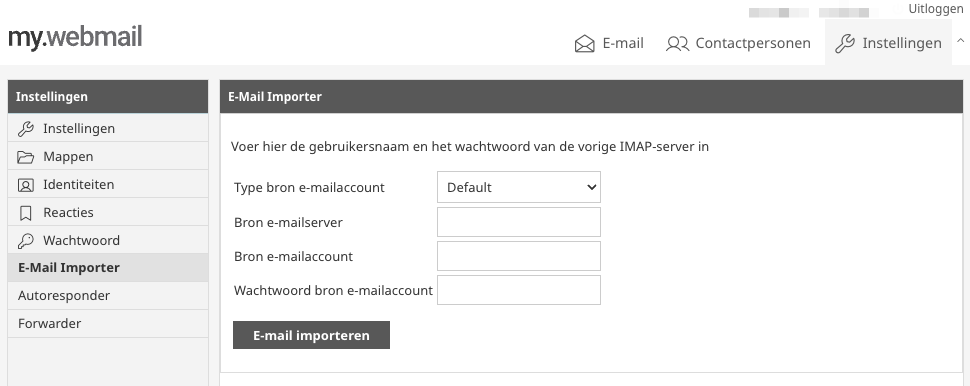
4. Click on Import email.
5. Wait a moment (about half a minute) until you see that the import has actually started.
Depending on the number of emails, the import can take anywhere from a few minutes to several hours. The importer transfers all folders and emails it finds in the source mailbox.