DNSSEC (Domain Name System Security Extensions) is a security extension to the standard DNS system.
It helps prevent internet users from being redirected to fake websites through so-called DNS spoofing or cache poisoning attacks.
Normally, DNS ensures that a domain name is translated into the correct IP address of the server. With DNSSEC, an extra layer of security is added: each DNS response is digitally signed.
This allows internet users and their systems to verify that the information is authentic and has not been tampered with.
Why is DNSSEC important?
- Protection against forgery: DNSSEC prevents cybercriminals from distributing false DNS information.
- Increased trust: users can be confident they are reaching the correct website.
- Required for certain applications: some secure applications and services require DNSSEC.
How do you enable DNSSEC with $$BrandName$$?
If you manage your domain name through $$BrandName$$, you can easily enable DNSSEC via the control panel. $$BrandName$$ will automatically handle the necessary keys and signatures.
It’s simple, no technical action is required from you.
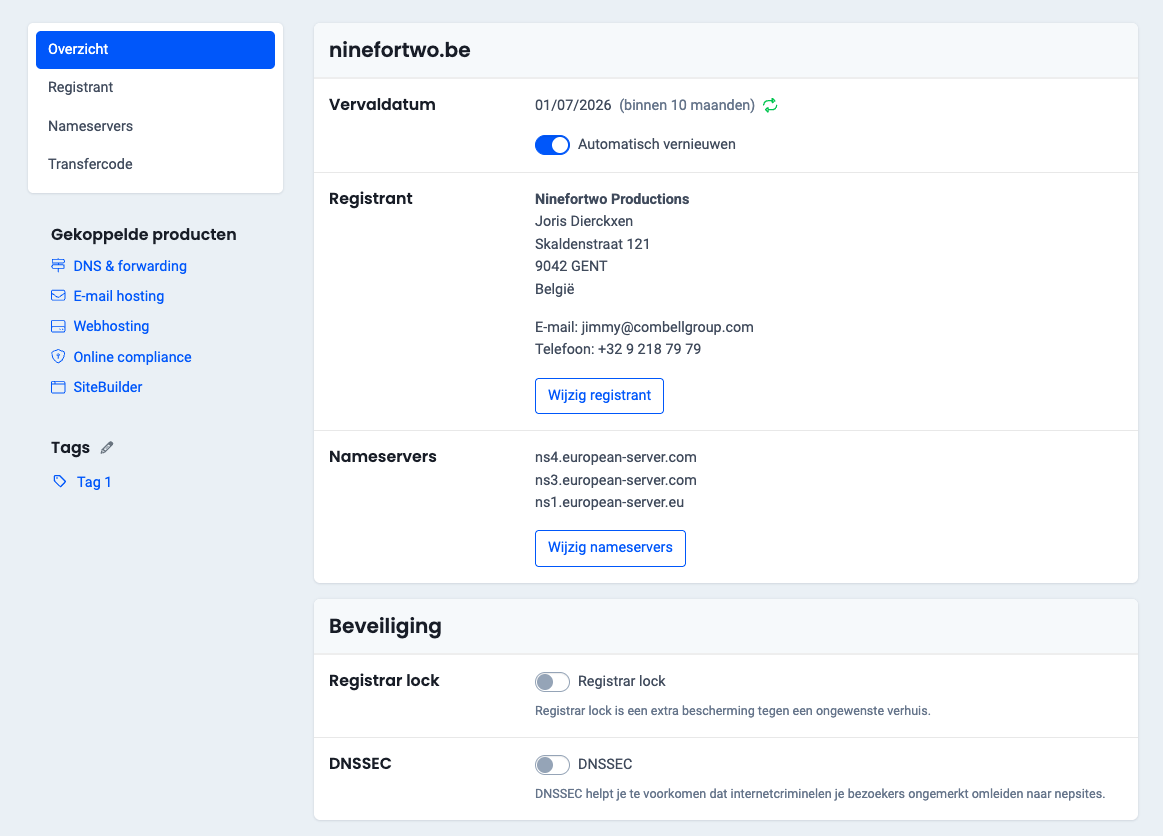
Follow these steps in the control panel to activate DNS SEC:
- Go to “My products”> “Domain names”> Click on the “Manage” button to the right of your domain name.
- In the overview of your domain name you see the slider for DNS SEC. Click on it to activate DNSSEC (see image).
ORIGINAL [829]
Needs a translation based on the updated Dutch article